

PCB(Feature Request) Multi-line PCB text justification in easyEDA Pro
2026-01-02 11:55:44
0
5
0
Hello,
I'm having trouble with text justification in the PCB editor.
(Similar question to https://oshwlab.com/forum/post/e1291aad5be745a888c97f8dbeb5901a, but in the pro version).
To be clear, I'm not trying to allign multiple pieces of text to eachother. I'm trying to allign multiline text to it's own bounding box, be it left or right and depending on the orientation up or down.
This is an example using a normal text editor:
| Left justification | Right justification |
| D1 | D1 |
The applied example: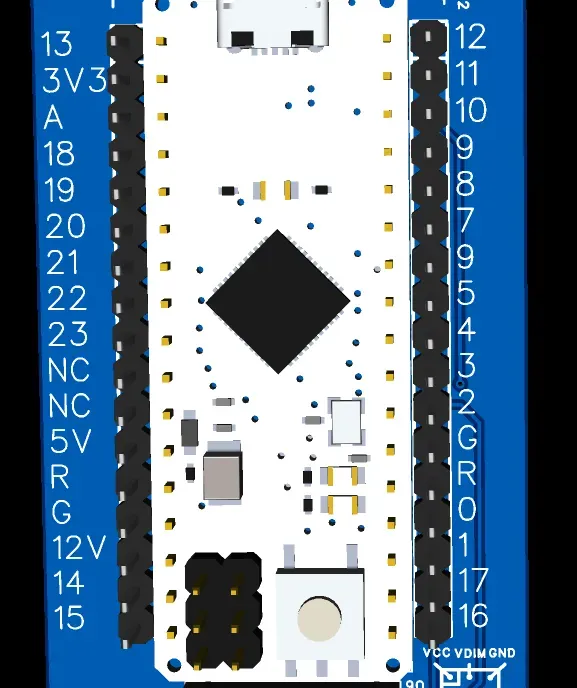
The text on the right side of the device is correct.
The text on the left side has left justification, causing it to leave a gap between the pins and the text.
Changing the origin (as done in the schematic editor) does not impact text justification (it does in the schematic editor).
I've used a workaround using a monospace font which I imported from the standard Windows fonts (cascadia mono) and added leading spaces to the text with the desired result: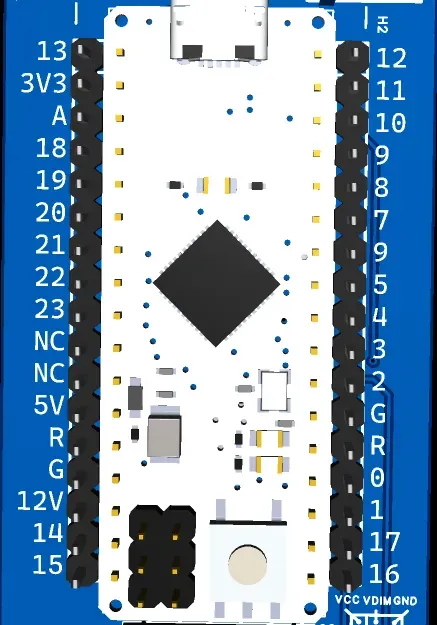
Can PCB text justification be added?
It seems like a needed tool for a lot of users, and it is already included for remarks in the schematics editor.
Thanks in advance!
Popular Posts
More
Comment